Accommodation & Homestay Management for Schools and Education Providers
Homestay shouldn't live in a spreadsheet, three inboxes, and someone's memory
SELMA's Accommodation module (also known as Homestay) manages the complete lifecycle of student housing, from onboarding host families and building a room inventory, to matching students to the right placement, running bookings, and handling all the associated invoicing and payments. Built for language schools and international education providers who manage housing themselves rather than outsourcing it, it replaces manual matching and scattered spreadsheets with a single system your team can actually rely on, one that tracks every host, every room, every booking, and every dollar owed in both directions.
Host and Provider Management
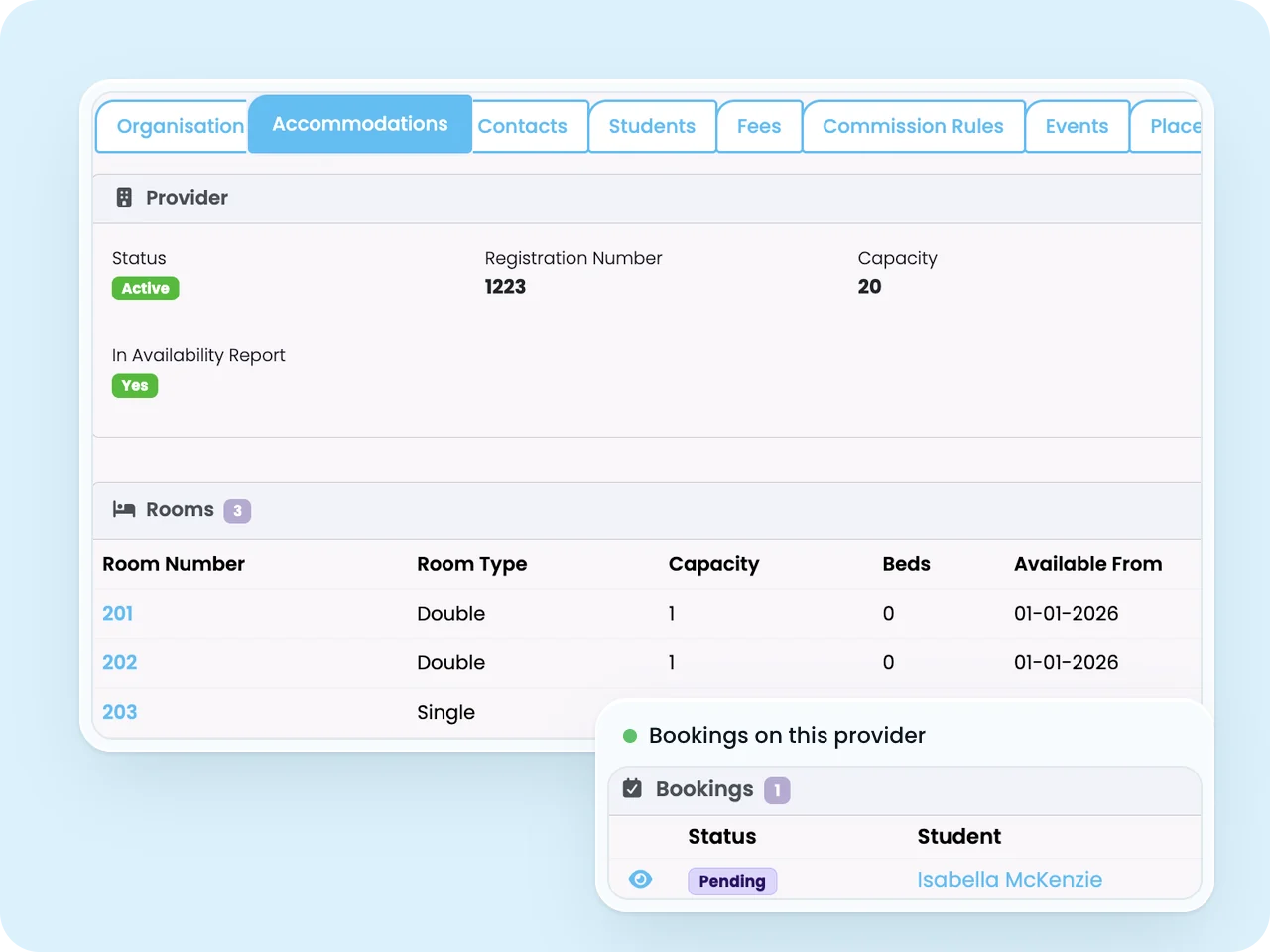
Every housing supplier, whether a host family, a boarding house, or a student residence, is set up as an Accommodation Provider with its own profile: name, city, capacity, registration number, host bio, and active status.
- Providers can be included or excluded from availability reporting at any time
- Setting a provider to inactive instantly removes their rooms from the booking wizard, so they can never be accidentally allocated
- A single, structured record replaces the spreadsheet-and-email trail most schools currently rely on to track their host network
Know exactly who your hosts are, where they are, and whether they're currently available, without digging through old emails.
Room and Bed Inventory
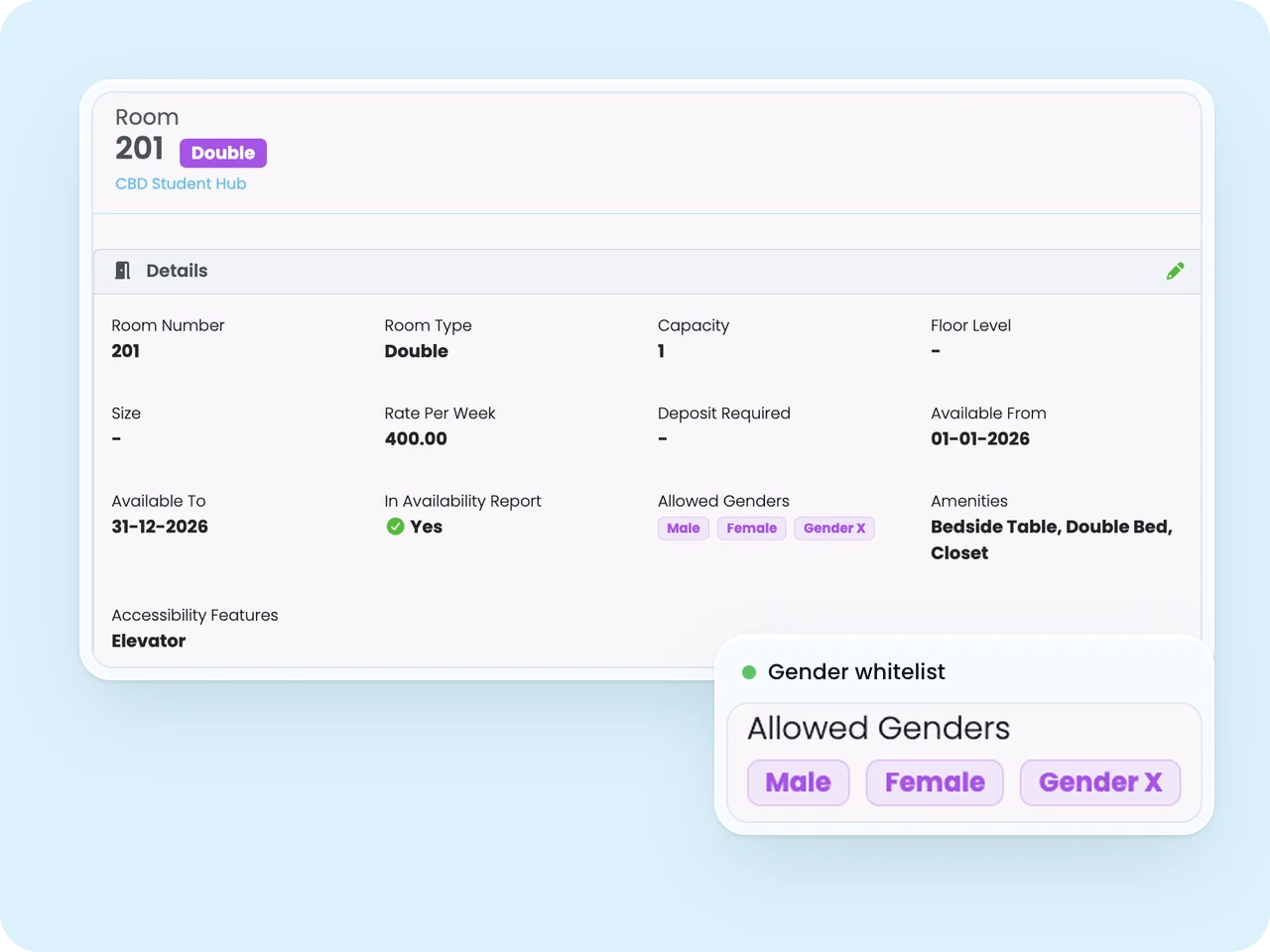
Each provider can hold any number of rooms, recording type, weekly rate, deposit, availability dates, amenities, accessibility information, and gender restrictions. Individual beds can be tracked separately within a room when finer control is needed.
- Room blocks mark a room unavailable for maintenance, renovation, or holidays, and appear visually on the calendar so it can never be double-booked
- Gender restrictions act as a whitelist, ensuring only eligible students are ever placed in a given room
- Occupancy is enforced automatically at bed level where bed records exist, or at room level otherwise
Always know exactly how many beds you actually have, and exactly which ones are free.
Smart Student Matching
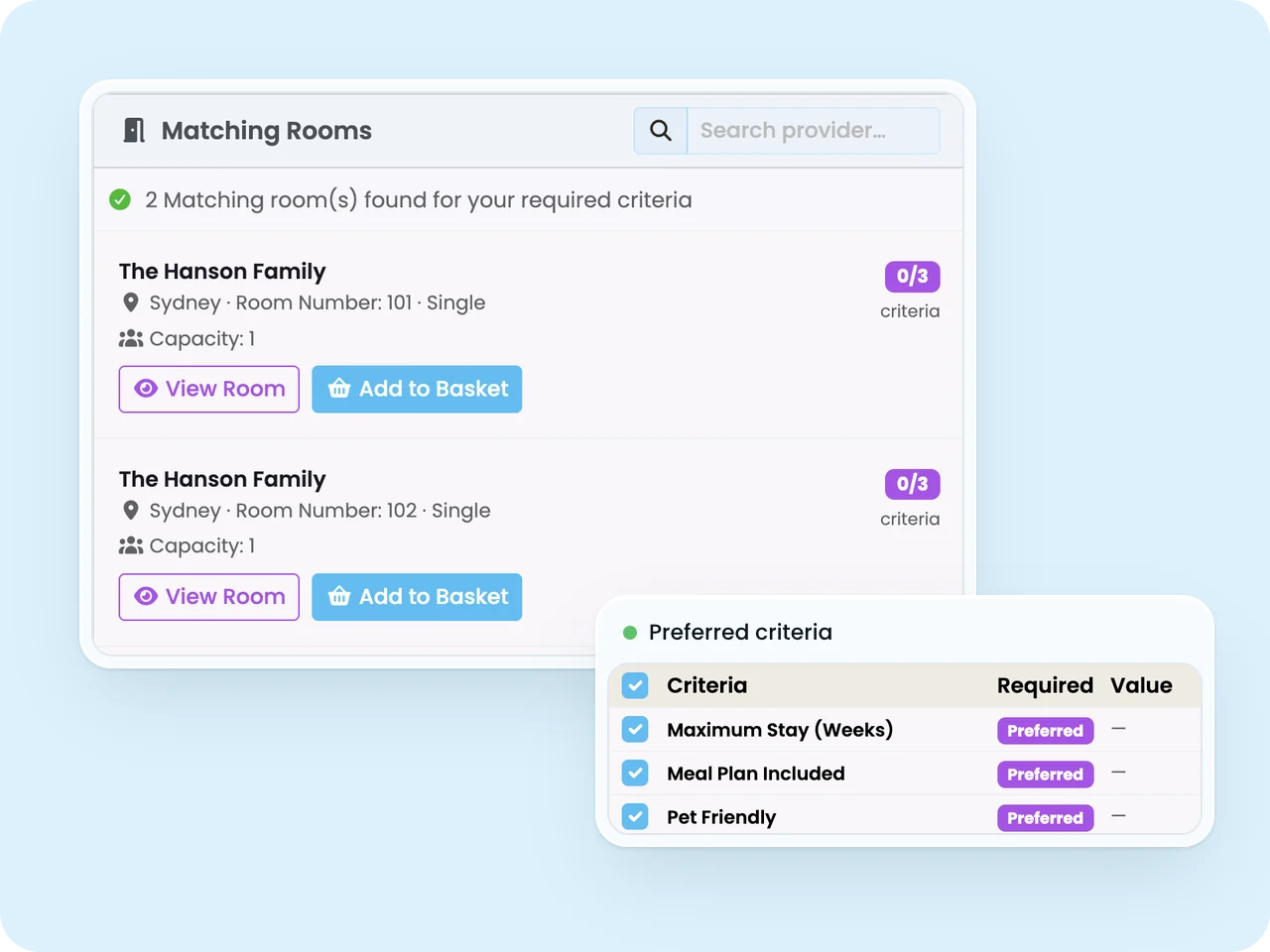
Each student's accommodation request captures arrival and departure dates alongside preferences such as pet-free, non-smoking, or dietary needs, each marked as Preferred or Required. When staff go to book, SELMA automatically scores and ranks every available room against those preferences.
- Required criteria are hard filters, so a room missing them is excluded entirely, and incompatibilities such as a pet allergy are handled automatically
- Preferred criteria raise a room's match score, surfacing the best-fit options first
- Group bookings merge preferences across members, so siblings or cohorts are matched together correctly
Stop matching students to hosts from memory. Let the system surface the best fit, every time.
A Guided Booking Workflow
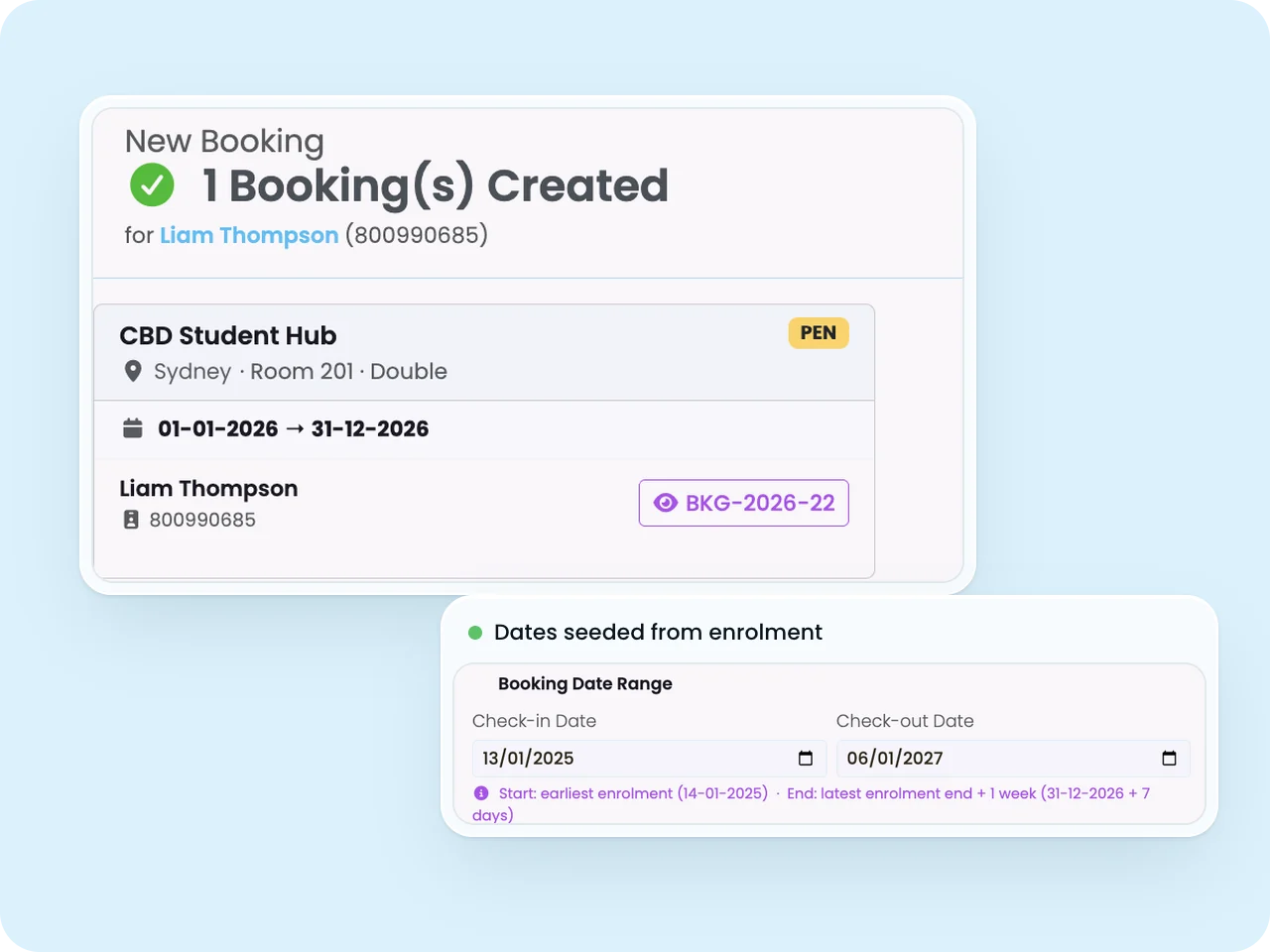
The New Booking wizard puts student search, preferences, and scored matching rooms side by side, so staff select a provider and room, add it to basket, and confirm, with fees automatically applied from the room's rate configuration.
- Bookings start as Pending and don't block other pending bookings, only confirmed ones do
- Confirming a booking automatically cancels any other overlapping pending bookings for that room
- Every booking carries a unique reference number, and check-in/check-out dates are seeded directly from the student's enrolment, removing double entry
Turn a multi-step, error-prone process into a guided workflow your team can complete in minutes.
Clear Status Tracking, Start to Finish
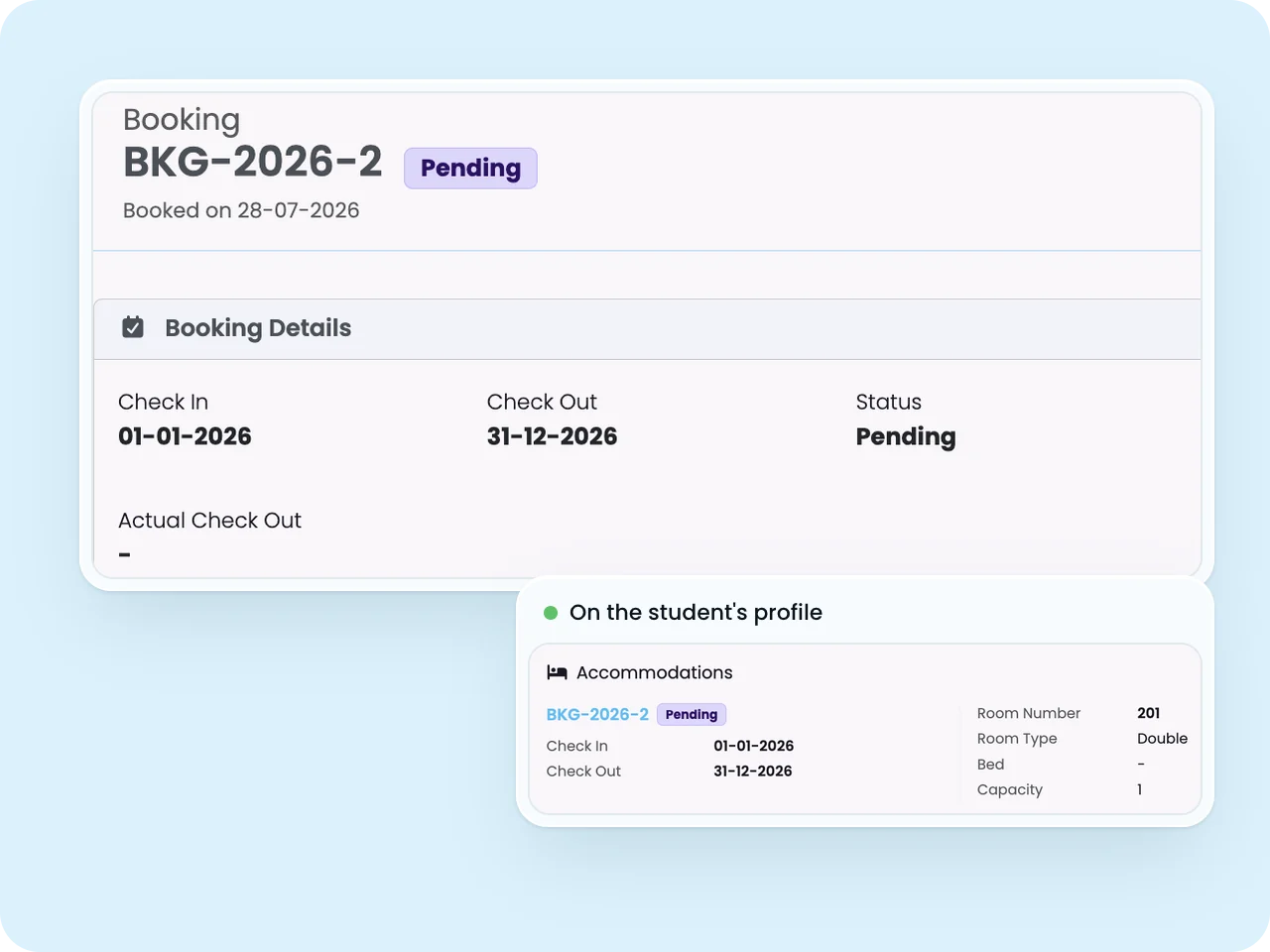
Every booking moves through a defined lifecycle, Pending, Confirmed, Active, Cancelled, and Finished or Completed, so staff always know exactly where a placement stands.
- Cancelled bookings retain their cancellation date, reason, and pro-rata charge automatically
- Once a booking reaches a terminal status, it's locked from further changes, protecting your records
- The full history is visible on the student's profile for easy review
No more guessing whether a booking is confirmed, finished, or fell through the cracks.
A Visual Calendar, Built for Drag and Drop
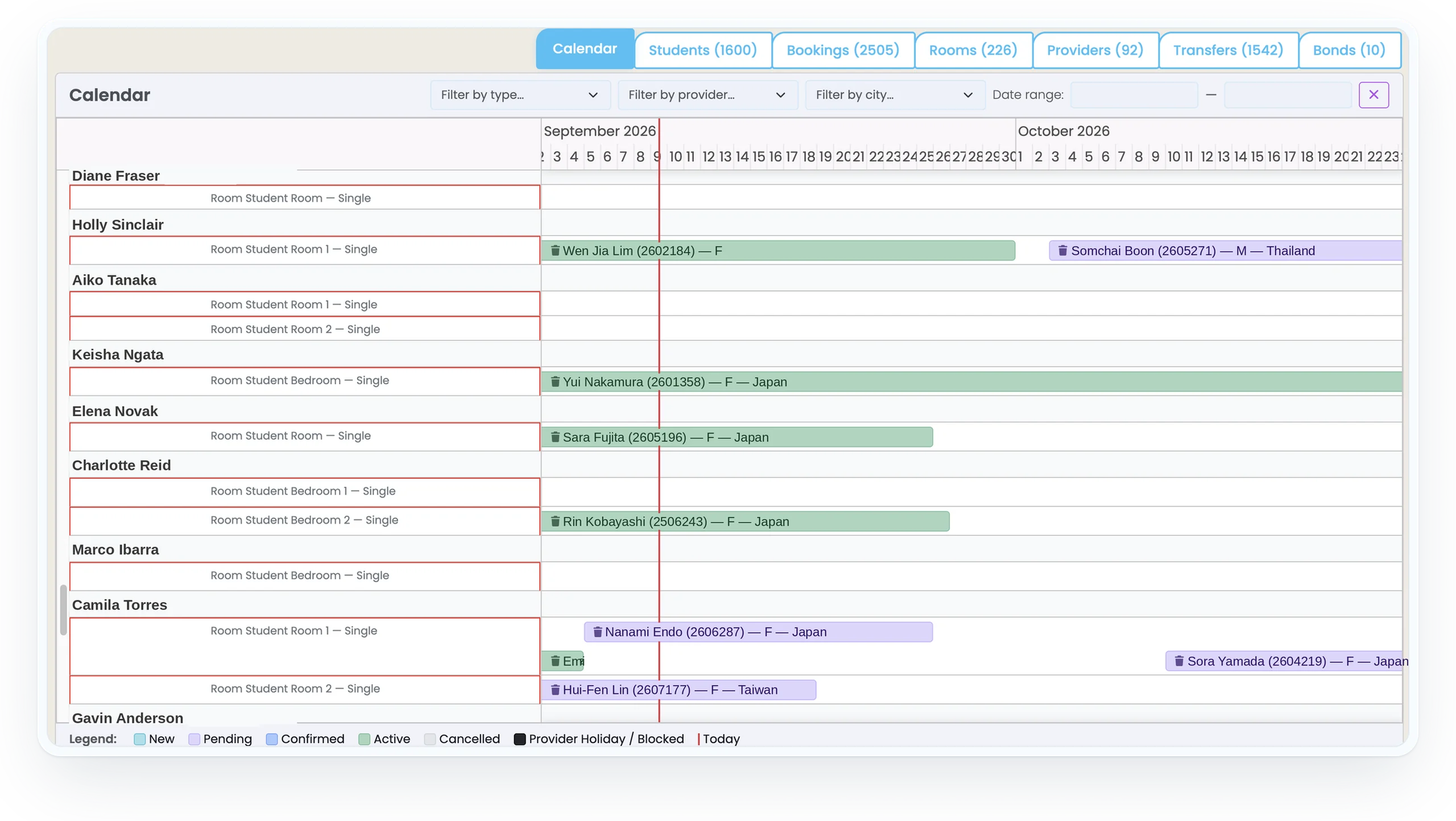
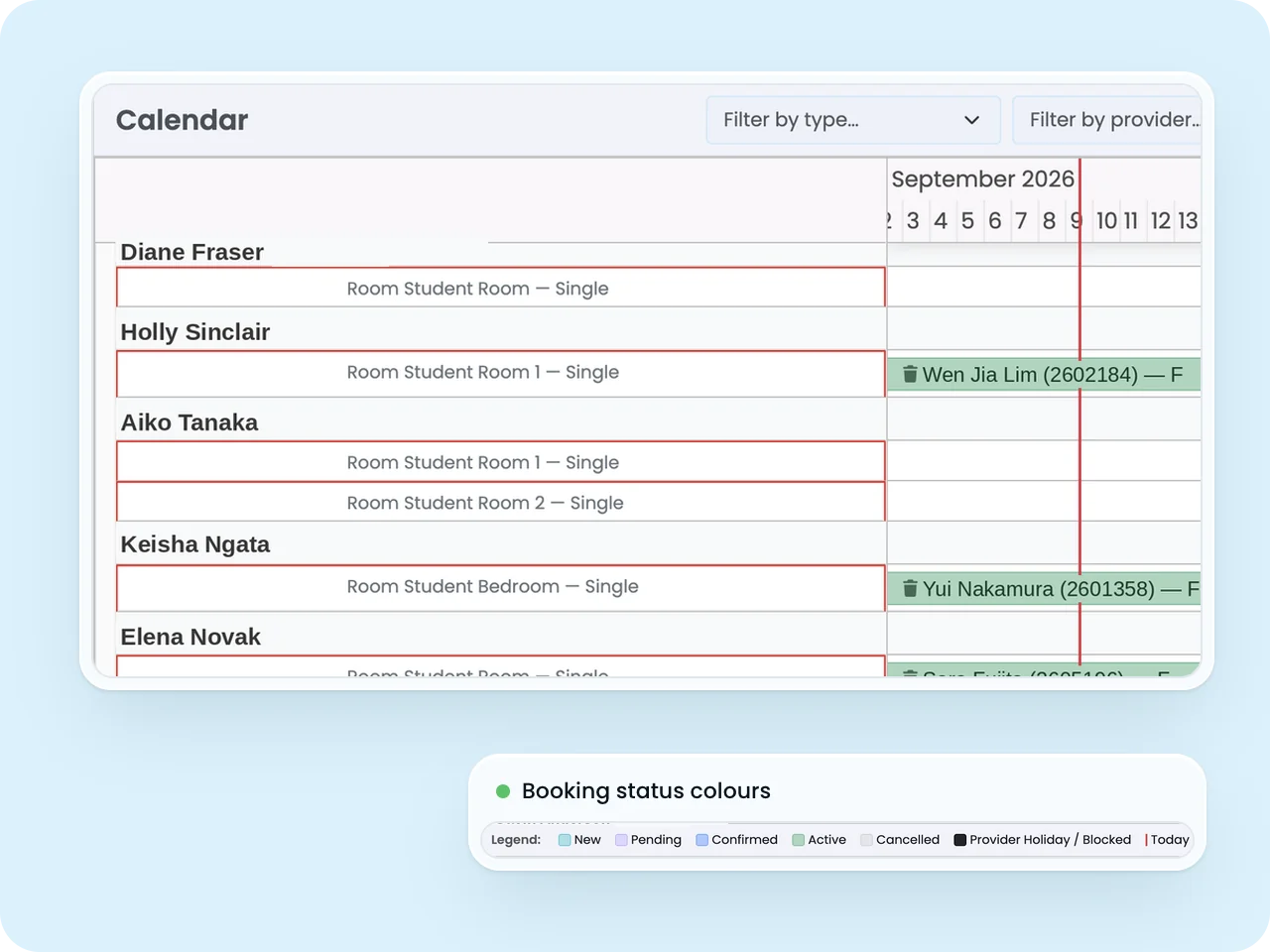
The Accommodation Calendar shows a full Gantt timeline of every booking, across every room, grouped by provider, with colour coding for pending, confirmed, active, cancelled, and room blocks at a glance.
- Filter by city to focus on a specific location, and hover any booking bar for full student details
- Drag a booking to a different room or date and SELMA validates the move in real time, blocking capacity conflicts and warning on gender or criteria mismatches
- A confirmation modal shows the before-and-after details before any move is committed
See your entire housing operation on one screen, and make changes with confidence, not guesswork.
Room Swaps, Cancellations, and Early Exits, Handled Properly
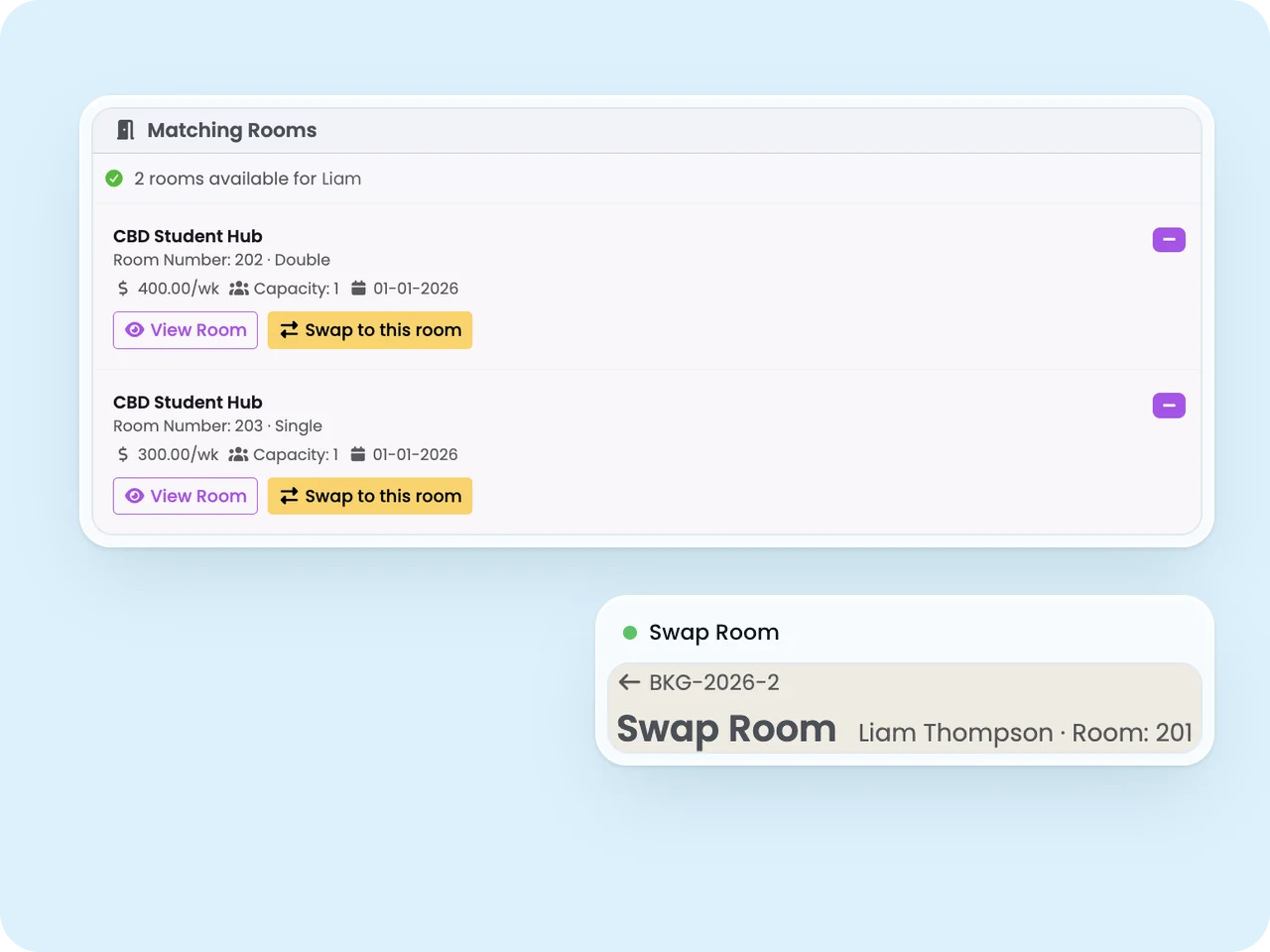
Staff can swap a student to a different room at any point, with the system automatically linking the original and new bookings for a fully auditable chain. Cancellations and early exits are handled through guided flows rather than manual adjustments.
- Early exits let staff set the exit date, reason, and bond handling, with a live credit preview before anything is confirmed
- The entire early exit process can be undone, restoring credit notes and payment instalments
- If staff try to shorten a booking after invoices are raised, SELMA automatically opens the correct Early Exit flow instead, protecting your finance records
Handle the messy, real-world exceptions, swaps, early departures, cancellations, without ever risking a billing error.
Invoicing on Both Sides of the Placement
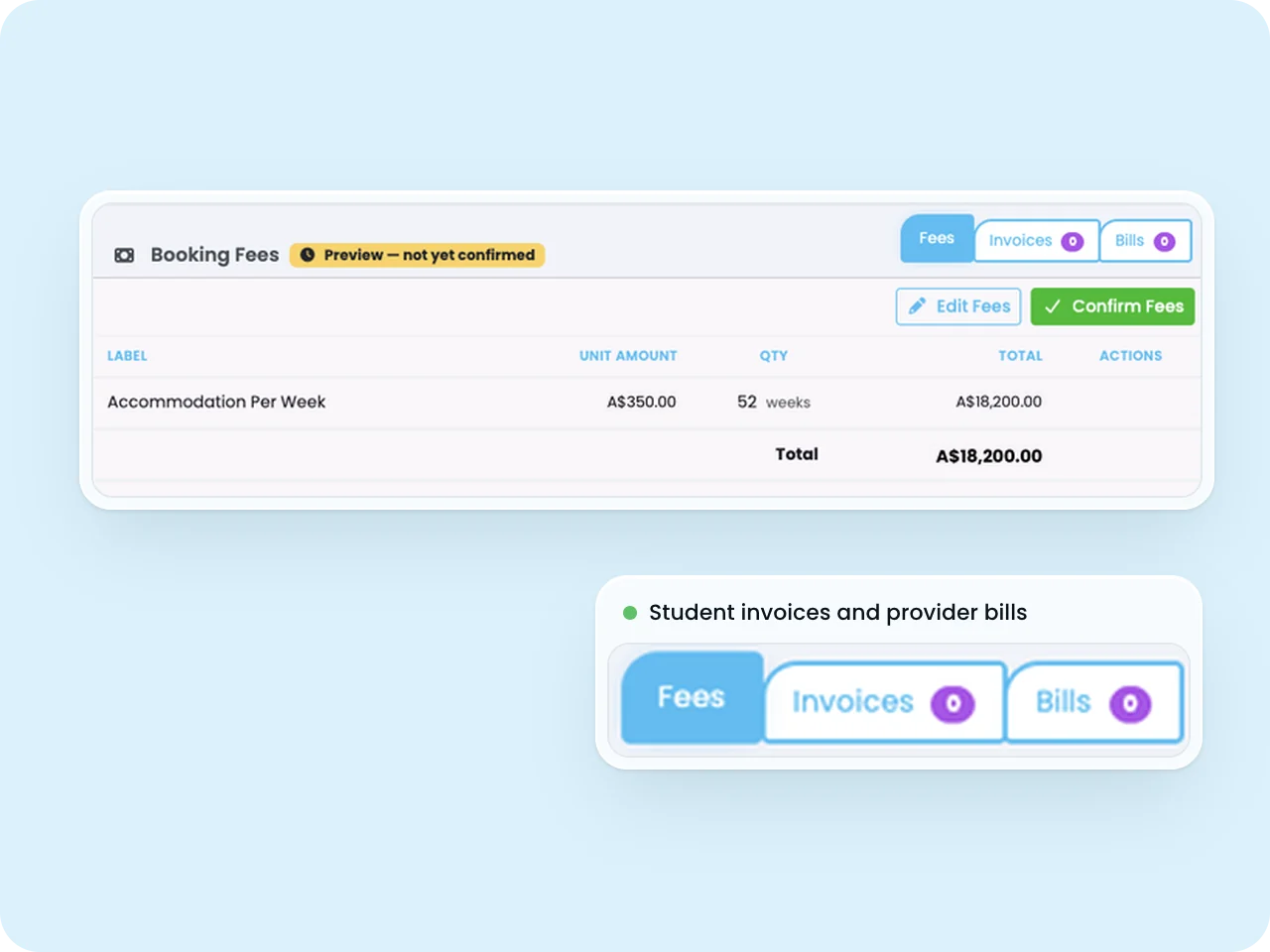
Once a booking is confirmed, a student invoice is generated automatically through SELMA's standard invoicing flow, with support for payment instalments and, for non-homestay accommodation, a refundable bond held by the school.
- Provider bills track exactly what the school owes each host, entirely separate from the student invoice
- Choose Weekly, Fortnightly, or Pay in Full frequency, with instalments calculated automatically and every bill visible under Finance
- Airport transfer fees can be charged to the student and billed to the host performing the transfer, all within the same system
Stop reconciling homestay payments by hand. Invoice students and pay hosts from one connected system.
Automated Notifications and a Full Audit Trail
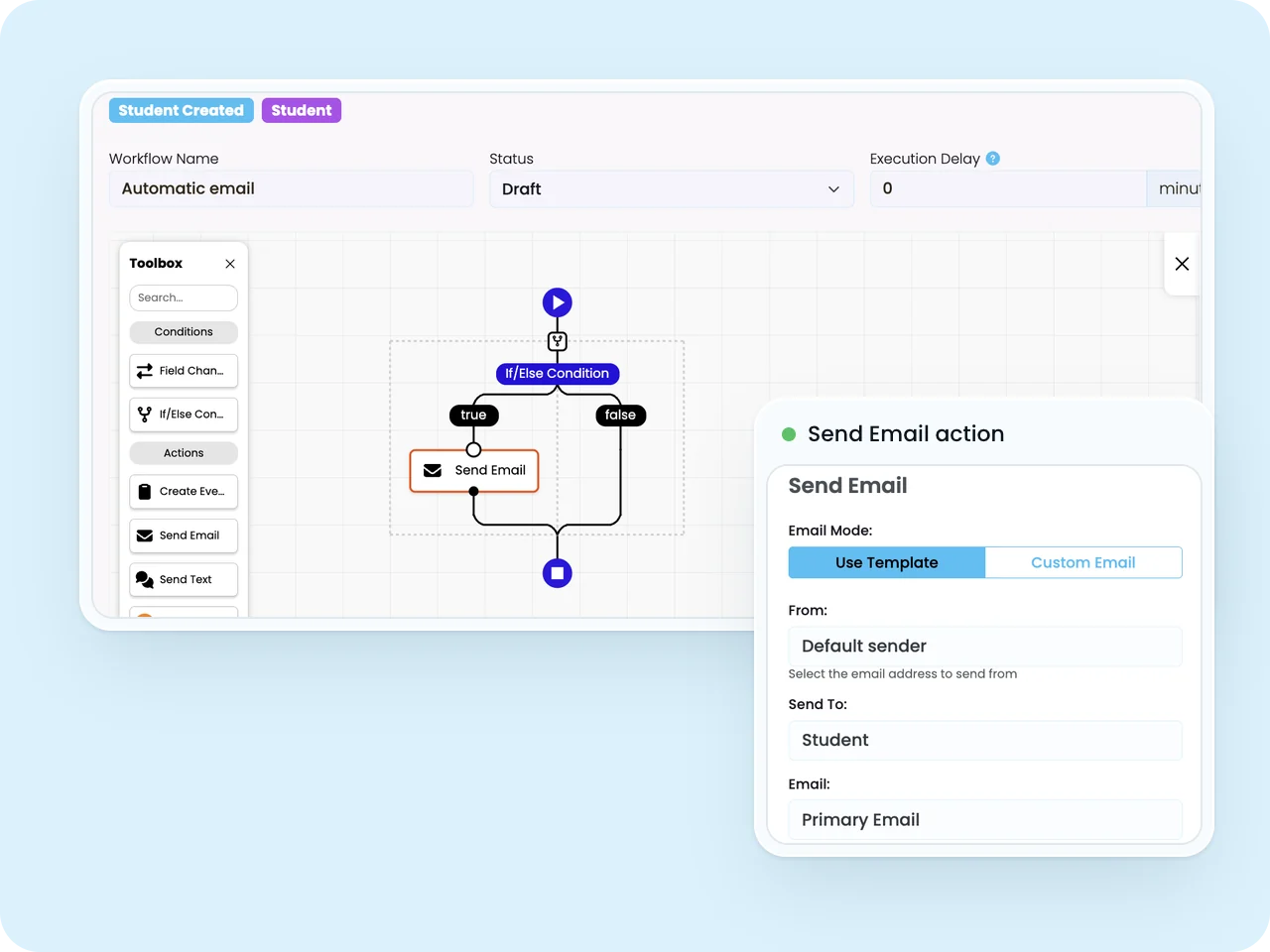
Accommodation bookings are first-class subjects in SELMA's Workflow Builder, so schools can trigger automated emails on booking events, notifying a host family when a booking is created, or a student when their placement is confirmed or updated.
- Configure your own notification workflows and templates to match your school's branding and process
- Every booking holds a complete audit log, generated automatically by workflows or added manually by staff
- Audit events are visible on the booking, the student's profile, and the provider's organisation record
Keep hosts and students informed automatically, and keep a defensible record of every decision.
Frequently Asked Questions
What is SELMA's Accommodation module?
SELMA's Accommodation module, also called Homestay, manages the full lifecycle of student housing for schools and education providers, including host provider onboarding, room and bed inventory, student-to-room matching, bookings, calendars, invoicing, and payments, all within one platform.
Is this only for homestay, or does it cover boarding and residences too?
It covers any accommodation type, including host families (homestay), boarding houses, and student residences. Each is set up as an Accommodation Provider with its own profile and room inventory.
How does SELMA match students to the right host or room?
Staff set student preferences (such as pet-free, non-smoking, or dietary needs) as Preferred or Required. SELMA automatically filters out rooms that fail Required criteria, scores remaining rooms against Preferred criteria, and ranks them by best match, including automatic handling of incompatibilities like pet allergies.
Can SELMA handle group or sibling bookings?
Yes. Students can be grouped for a shared placement, and SELMA merges their preferences automatically, applying any Required criterion from one member to the whole group when matching rooms.
Does the system prevent double-booking a room?
Yes. Confirmed bookings block any other confirmed booking for the same room on overlapping dates. Pending bookings do not block each other, and confirming one automatically cancels other overlapping pending bookings for that room.
How are host families or providers paid?
SELMA generates separate provider bills, distinct from student invoices, once a booking is confirmed and the student has checked in. Schools choose Weekly, Fortnightly, or Pay in Full frequency, and instalments are calculated automatically.
What happens if a student leaves early?
Staff use the Early Exit flow to record the exit date, reason, and bond handling, with a live credit preview shown before anything is confirmed. The process automatically applies credit notes, cancels future instalments, and can be fully undone if needed.
Can staff move a student to a different room after check-in?
Yes. A room swap closes the original booking and creates a new, linked booking for the new room, carrying forward dates, notes, and rate, with a suffixed reference number so the change is fully auditable.
Does SELMA send automated emails to hosts and students?
Yes. Because accommodation bookings are built into SELMA's Workflow Builder, schools can configure automated emails triggered on booking events, such as confirmation notices to students or new-placement alerts to host families, using their own templates and branding.
Is there an audit trail for accommodation bookings?
Yes. Every booking maintains a complete audit log, capturing both automated workflow events and manual staff actions, visible on the booking itself, the student's profile, and the provider's record.
Does the calendar show all bookings across every host?
Yes. The Accommodation Calendar displays a Gantt-style timeline of every booking across every room and provider, colour-coded by status, filterable by city, and editable directly via drag and drop with real-time validation.
Run a compliant, scalable education operation on one professional platform.
See how SELMA handles enrolment, compliance and delivery in a 30-minute walkthrough.